Showing posts with label UFT - API Testing. Show all posts

Tuesday, July 15, 2014

UFT API - control VCloud machines from UFT

You can control VCloud with an API test in UFT. Here is How.


1. Create a new API test.
2. Let's say we want to Revert to Snapshot a machine:
Add a HTTP Request and add following properties:

URL: https://vcloud.example.com/api/vApp/{vapp-id}/action/revertToCurrentSnapshot
HTTP Method: POST
Request headers:
Accept: application/*+xml;version=5.1
Authorization: Basic + (User + Pass in Base64)


3. Run the test and the machine will be reverted.

Here is a list with a lot more useful commands:
http://pubs.vmware.com/vchs/index.jsp#doc/landing-user_operations.html

Also use Postman - Rest Client Addin from Google Chrome to test your requests:
https://chrome.google.com/webstore/search/postman%20rest%20client?utm_source=chrome-ntp-icon


Wednesday, August 21, 2013

Permissions for creating Business Process Tests and FLows

You need to assign your user account to BPTester group.

Here what you need to do:
1. Open project in QC (ALM).
2. Go to Tools -> Customize -> Groups and Permissions.
Note! This is available only if you are a project administrator.
Note!! This is available only if your ALM is version11.50 or later.

3. Add your user to BPTester Group.

Creating Business Process Test or Flow is supported only starting with ALM 11.50.
If you get this message when trying to create a new Business Process Test or Flow, you probably have an older ALM (like 11.0).


Tuesday, July 16, 2013

UFT - API Testing save test steps results

In UFT you might need to save the results of a step for further use, or see the results in the generated reports.
Here are some useful options:

1. Write to test Output Properties:
CodeActivity<x>.Output.PropertyName = "string property value";

2. Write to test profile:
CodeActivity<x>.Context.TestProfile.SetVariableValue("variable name","variable value");

3. Write to Output Console:
this.CodeActivity<x>.Context.UserLogger.InfoFormat("some string you want to see");

4. Write to generated Report after Run.
this.CodeActivity<x>.Report("some string you want to see");

Wednesday, July 10, 2013

UFT - Return formated Date


I needed to get current date in this specific format: 2013-07-10T10:03:45.285+03:00
then, make it available for future activities, so here is what I did:

1. Created a Custom Code activity "GetTodayDate".

2. Added a Result Output Property.
Name: Result
Type: String

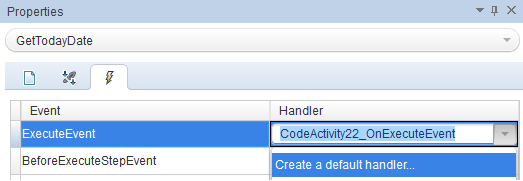
3. Go to Events Tab -> Create a default handler... for ExecuteEvent


4. Add following code:

public void CodeActivity22_OnExecuteEvent(object sender, STActivityBaseEventArgs args)
        {
            string date = XmlConvert.ToString(DateTime.Now,XmlDateTimeSerializationMode.Local);                               
            CodeActivity22.Output.Result = date;
        }

5.  Result:


6. Now I can link the Result and use it in future activities.