In UFT you might need to save the results of a step for further use, or see the results in the generated reports.
Here are some useful options:
1. Write to test Output Properties:
CodeActivity<x>.Output.PropertyName = "string property value";
2. Write to test profile:
CodeActivity<x>.Context.TestProfile.SetVariableValue("variable name","variable value");
3. Write to Output Console:
this.CodeActivity<x>.Context.UserLogger.InfoFormat("some string you want to see");
4. Write to generated Report after Run.
this.CodeActivity<x>.Report("some string you want to see");
Tuesday, July 16, 2013

Thursday, July 11, 2013
C# - Get Computer Name
string hostName = Environment.MachineName;
string name = System.Net.Dns.GetHostName();
string name1 = System.Windows.Forms.SystemInformation.ComputerName;
string name2 = System.Environment.GetEnvironmentVariable("COMPUTERNAME");
Wednesday, July 10, 2013
UFT - Return formated Date
I needed to get current date in this specific format: 2013-07-10T10:03:45.285+03:00
then, make it available for future activities, so here is what I did:
1. Created a Custom Code activity "GetTodayDate".

2. Added a Result Output Property.
Name: Result
Type: String

3. Go to Events Tab -> Create a default handler... for ExecuteEvent
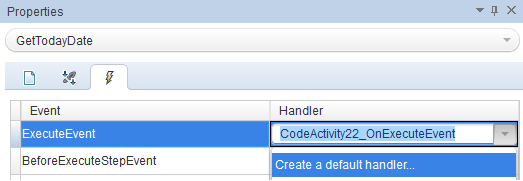
public void CodeActivity22_OnExecuteEvent(object sender, STActivityBaseEventArgs args)
{
string date = XmlConvert.ToString(DateTime.Now,XmlDateTimeSerializationMode.Local);
CodeActivity22.Output.Result = date;
}
5. Result:

6. Now I can link the Result and use it in future activities.

Friday, July 5, 2013
UFT - Postgres on Windows via ODBC
For API testing in UFT (HP Unified Functional Testing) you might need to connect to a Postgres database.
1. For this you need to get an ODBC driver for Postgres:
http://www.postgresql.org/ftp/odbc/versions/msi/
2. Install it.
3. Go to %systemdrive%\Windows\SysWoW64 and add the Driver.

4. In UFT go to Data pane -> New Data Source -> Database and add database info.

1. For this you need to get an ODBC driver for Postgres:
http://www.postgresql.org/ftp/odbc/versions/msi/
2. Install it.
3. Go to %systemdrive%\Windows\SysWoW64 and add the Driver.

4. In UFT go to Data pane -> New Data Source -> Database and add database info.

Wednesday, April 17, 2013
Object Lock error in HP ALM (QC)
If you get an Object Lock error in QC ("Object locked by 'username' ") here are the steps to solve it:
1. Go to Site Administration.
2. Search for the corresponding Project.
3. Find the LOCKS table.
4. Execute following script:
DELETE FROM LOCKS WHERE LK_USER = 'username'
1. Go to Site Administration.
2. Search for the corresponding Project.
3. Find the LOCKS table.
4. Execute following script:
DELETE FROM LOCKS WHERE LK_USER = 'username'
Saturday, December 8, 2012
How to execute Compound class names using WebDriver
If you have a Compound class and you want to do something like this:
IWebElement elem = Browser.Driver.FindElement(By.ClassName("name1 name2 name 3"));
you will get an error like:
"Compound class names are not supported. Consider searching for one class name and filtering the results."
The solution:
Use CssSelector, and put "." in front of each name, like this:
IWebElement elem = Browser.Driver.FindElement(By.CssSelector(".name1.name2.name 3"));
IWebElement elem = Browser.Driver.FindElement(By.ClassName("name1 name2 name 3"));
you will get an error like:
"Compound class names are not supported. Consider searching for one class name and filtering the results."
The solution:
Use CssSelector, and put "." in front of each name, like this:
IWebElement elem = Browser.Driver.FindElement(By.CssSelector(".name1.name2.name 3"));
Remove utorrent toolbar from Chrome
If you have this annoying problem here is how to fix it:
1. Go to C:\Users\[Username]\AppData\Local\ and remove CRE and Conduit directories.
2. Start -> regedit -> search for '\AppData\Local\CRE' and remove any related Extensions.
1. Go to C:\Users\[Username]\AppData\Local\ and remove CRE and Conduit directories.
2. Start -> regedit -> search for '\AppData\Local\CRE' and remove any related Extensions.
Subscribe to:
Posts (Atom)